
Moonlighter 2: The Endless Vault Controls and Binds
Rebindable keyboard, mouse, and controller, plus the habits that matter in Tresna.
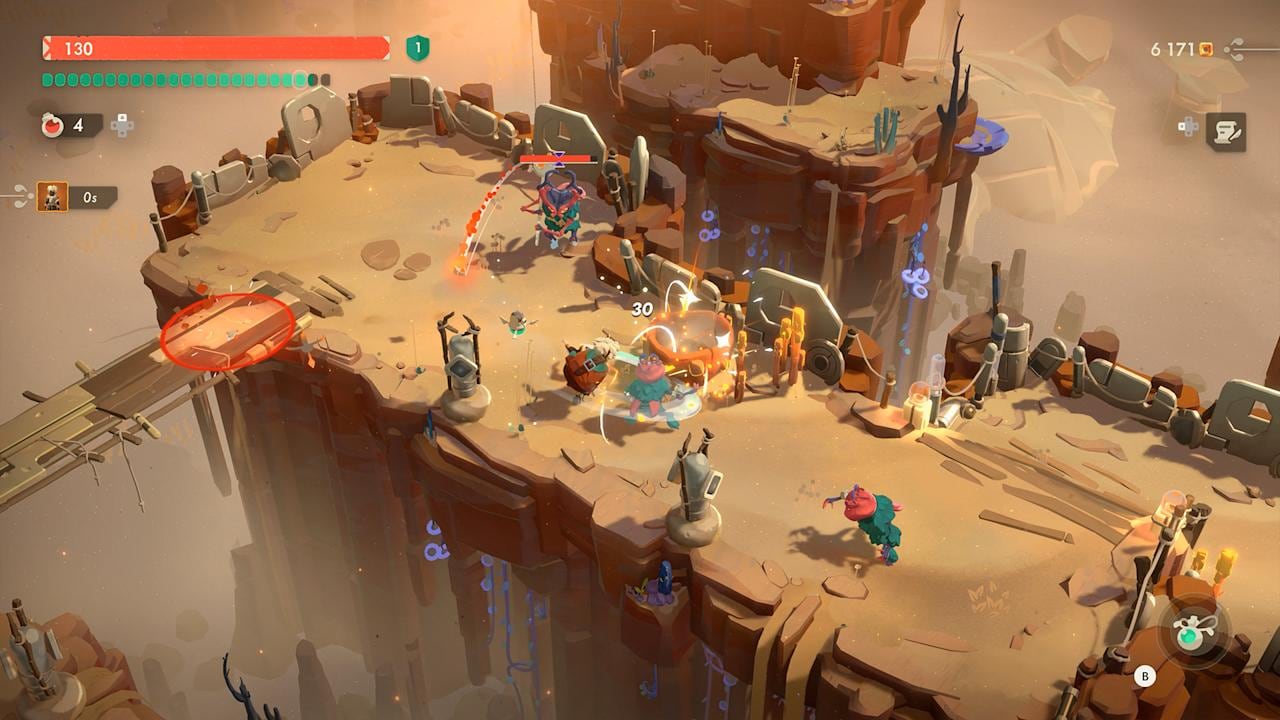
Moonlighter 2: The Endless Vault lets you rebind every action on keyboard and mouse and on a controller. There is no locked “pro” layout. Combat was built to feel good on a pad; the Codex, shop, and backpack still feel faster with a mouse. Steam Deck Verified means the same actions exist on a handheld. This page is the habit list, not a screenshot of one person’s binds. Pair it with Getting Started and the Combat guide. Shop hotkeys matter less than faces; those live under shop prices.
Open Options as soon as Ms Scratch finishes yelling. If a default fight button sits on a finger you hate, change it before Kalina teaches you the wrong muscle memory.
Keyboard, mouse, and controller
You can play the whole game on either device. A practical split:
- Controller in dungeons. Roll, aim, and smash want analog movement. Full controller support includes remapping, prompts, and hotplug.
- Mouse in Tresna. Codex, research screens, and dragging relics onto showcases are pointer jobs.
- Steam Deck. Verified. Use the pad layout in rooms and the trackpads in menus if you want the hybrid.
Rebind attack, special, roll, backpack, gun, potion, map, inventory, and pendant separately. Do not leave two actions on one key “because the first Moonlighter did.” This sequel added gun aim and a backpack smash that only works in Rupture. Shared keys will eat a smash when you meant to roll.
Prompts follow the device you last touched. If icons flip while a customer is browsing, that is hotplug, not a bug. Finish the sale, then pick a device for the rest of the shift.
Roll
There is no stamina bar. Roll is free. Use it as:
- A dodge during strings.
- A movement button in Tresna, because Will does not sprint.
- A cancel when a large-sword swing is a bad idea.
You can roll into a pendant escape. You do not have to stand still to leave. Infinite rolls are not an exploit; Prima-style tips have said the same since Early Access. The only cost is that rolling into a pit still drops you, and rolling through a trap still hurts.
Short swords like rolling between hits. Gauntlets like rolling after a Berserk trade. Spears like rolling to the edge before recall. Learn the class on the builds list before you blame the bind.
Backpack smash
Smash is a Rupture attack. Enemies in the black-purple aura can be launched into walls, into each other, or off a ledge. Some bosses require a smash on a dropped object. It is a terrible normal attack. Using it on a healthy trash mob wastes the animation and does not pop the bag.
Bind smash on a bumper or a key you will not panic-tap. If you keep smashing during a roll, you rebound poorly. Practice on Kalina Rupture slimes before Herald. The Backpack guide covers tiles; this page only cares that the button is not the same as attack.
Gun aim
Guns are a second stance, not a modifier on melee. Aim, then fire. Blob Gun is the starter. Blo-Beam wants space. Blo-Blaster wants faces. Blo-Blitz wants you to keep moving. On a pad, aim is the stick you already use to look; on mouse, the cursor is the aim. Rebind gun separately from special so a spear recall does not eat a shot.
Fliers and balcony enemies exist so that a melee-only bind setup feels incomplete. If you refuse to aim, you will still clear Kalina and you will hate The Gallery. Put gun on a comfortable trigger.
Hold F to teleport in town
Tresna is large enough to waste time. Open the map, hover an NPC icon, and hold F (default on keyboard) to teleport to that vendor. Andrei, Eris, Tomo, Babyl, Nou, the Countess, Scratch, Julien, Sliver, and the Vault all have icons once they exist. You do not need to roll the long way unless you like the scenery.
If hold F does nothing, you are not hovering a valid icon, you rebound the map-teleport action, or you are still in a dungeon. The pendant is the dungeon escape; hold F is town only. Controller users should rebind the same command to a hold on the map screen so they are not hunting for F on a pad.
Potion hotkey, top-left
Potions are a run resource, not a stack you buy per sip. The top-left of the dungeon HUD shows how many you have and which hotkey drinks one. Look there before a boss, not after you are at 10 HP. Eris sells count and potency. Sunglass Savior patches and similar upgrades change how much a sip heals; they do not move the HUD.
Rebind potion off whatever key you use to confirm menus if you keep drinking in the Codex. One potion at the start of the game is normal. Panic-sipping in a room you can leave with the pendant is how Hardcore 1.0 runs die.
Pendant, map, and shop
The pendant warps you back to Tresna from a run. Use it while rolling if the room is lost. There is no huge gold fee like the first game; the cost is leftover backpack effects and skipped loot. Map is Codex plus radar. In the shop, you cannot yank a relic or restamp it while a customer is mid-browse (speech-bubble dots). Wait. Then restamp.
If a bind fights the shop, make a second profile: dungeon set and town set. The game allows remaps; it does not require you to suffer a shared confirm key.
That is the whole control job: rebind, roll for free, smash only on Rupture, aim the gun, hold F in town, drink from the top-left hotkey. Everything else is a build. Return to the Tools Hub for prices and Vault numbers.
Frequently Asked Questions
Quick answers to the most common questions.
Can I rebind keyboard and controller?
Yes. Every action can be remapped on both. Change smash, gun, and potion first so they do not share a panic key.
Is there a stamina bar for rolling?
No. Roll as often as you want in dungeons and in Tresna. Will has no sprint; rolling is how you move faster in town.
When should I backpack smash?
Only when an enemy is Ruptured (black-purple aura) or a boss script asks for it. It is not a third light attack.
How do I teleport to NPCs in Tresna?
Open the map, hover their icon, and hold F on keyboard (or your rebound hold). This does not work inside a dungeon; use the pendant there.
Where is the potion key shown?
Top-left of the dungeon HUD, under the other meters. The label is whatever you bound. Eris upgrades how many sips you take into a run.